

Description
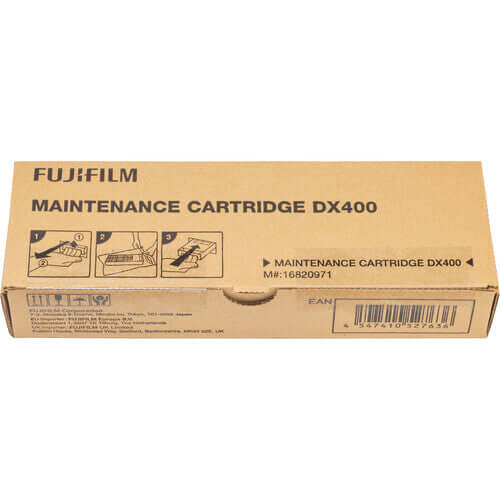
Genuine Fujifilm DX400W Waste Ink Tank (Maintenance Box) — Part No. 16820971. The maintenance tank is a non-optional consumable in the Frontier DX400W system. It collects waste ink generated during every printhead cleaning cycle, and the printer will stop printing automatically when the tank reaches capacity. Replacing it with a genuine Fujifilm unit (16820971) is the only way to reset the printer's waste ink counter and return to normal operation.
Why the Maintenance Tank Is Not Optional
Every time the Fujifilm Frontier DX400W performs a printhead cleaning — automatically or manually — a small amount of ink is flushed through the heads and collected in the maintenance tank. This is a normal and necessary part of how the printer maintains consistent nozzle performance and print quality.
The DX400W tracks the cumulative volume of waste ink collected and alerts the operator when the tank approaches capacity. When the tank is full, the printer will halt all print jobs until it is replaced. There is no workaround — the counter resets only when a genuine Fujifilm replacement tank is installed. Using a non-genuine or improvised solution risks overflow, internal contamination, and costly printhead or chassis damage.
For high-volume labs and photo booth operators running the DX400W through sustained production, keeping a spare maintenance tank on hand is standard practice. Replacement takes under two minutes from the front of the printer with no tools required.
Key Features
- Collects all waste ink from cleaning cycles — Captures flushed ink safely, preventing internal contamination of the printer chassis, electronics, and paper path.
- Automatically tracked by the printer — The DX400W monitors remaining capacity and displays a low-tank warning before the unit is full, giving you time to order a replacement without production interruptions.
- Resets the waste ink counter — Installing a genuine Fujifilm replacement unit is the only way to reset the printer's internal waste ink counter and resume normal operation.
- Front-access replacement, no tools required — The maintenance tank slides in and out of the front maintenance bay in under two minutes, keeping downtime minimal even in busy production environments.
- Leak-proof sealed construction — Heavy-duty sealed plastic housing prevents spills during removal and disposal.
How to Replace the DX400W Maintenance Tank
Fujifilm publishes an official step-by-step Maintenance Box Replacement guide. For complete illustrated instructions, refer to the official Fujifilm Maintenance Box Replacement PDF. The general process is:
- Wait for the printer to display the maintenance tank replacement alert or confirm the tank is full via the operator panel.
- Open the front maintenance bay door — no tools required.
- Slide the full maintenance tank straight out of its slot.
- Insert the new genuine Fujifilm maintenance tank (16820971) until it clicks into place.
- Close the bay door. The printer automatically detects the new unit and resets the waste ink counter.
- Resume normal printing.
Technical Specifications
| Brand | Fujifilm |
| Product Type | Waste Ink Tank / Maintenance Box |
| Compatible Printer | Fujifilm Frontier DX400W Inkjet Dry Lab |
| Part Number / SKU | 16820971 |
| Also Known As | Maintenance Cartridge, Waste Ink Box, Maintenance Box |
| Construction | Sealed heavy-duty plastic, single-use |
| Access | Front-access bay — no tools required |
| Packaging | Brand new, factory sealed |
| OEM / Third-Party | OEM — 100% Genuine Fujifilm |
Frequently Asked Questions
The Fujifilm Frontier DX400W will not allow printing to continue when the maintenance tank reaches capacity. It halts all print jobs automatically to prevent waste ink overflow, which could damage the printhead, contaminate the paper path, and cause expensive internal corrosion. The printer will resume only after a genuine replacement tank is installed.
No. The maintenance tank is a sealed single-use unit. It is not designed to be opened, drained, or refilled. Attempting to do so risks ink spills inside the printer and may void your warranty. Always replace with a new genuine Fujifilm unit (part no. 16820971).
The DX400W displays a warning on the operator panel when the maintenance tank is approaching capacity, giving you advance notice to order a replacement. When the tank is completely full, the printer halts printing until the tank is replaced. Do not wait for the printer to halt — order a replacement as soon as the low-tank warning appears.
Replacement frequency depends entirely on how many printhead cleaning cycles the printer performs, which in turn depends on print volume, how often the printer is powered on and off, and whether manual cleanings are triggered. High-volume labs running continuous production will replace the tank more frequently than low-volume operations. There is no fixed interval — monitor the printer's alert system.
Yes. Part number 16820971 is the genuine Fujifilm maintenance tank (waste ink box) for the Frontier DX400W series. Note that this part number is specific to the maintenance tank — it is separate from all six ink supply units, which have their own distinct part numbers.
No. The DX400W automatically detects the new genuine Fujifilm maintenance tank when it is installed and resets the waste ink counter without any manual calibration or software steps. Simply install the unit, close the bay door, and resume printing.
The full maintenance tank contains waste ink and should be disposed of in accordance with your local regulations for ink-containing waste. Do not attempt to open the sealed unit before disposal. Place it in a sealed bag to prevent any potential leakage during transport.
Complete Your DX400W Supplies
The maintenance tank works alongside the DX400W's six-color ink system. Keep all consumables stocked to avoid production interruptions:
→ DX400W User Manual, Setup Guide & Downloads
About Eventprinters.com
We've been supplying professional photo labs, studios, and event photographers with genuine printer consumables since 1996. Every product we sell is sourced directly from authorized distribution channels — you'll never receive gray-market or counterfeit product. Free ground shipping on orders over $149. Questions? Call us at 305-653-0037 (Mon–Fri, 9am–5pm EST).