
FUJIFILM Frontier DX400W Review: Is It Right for Your Photo Business?
The FUJIFILM Frontier DX400W is a compact professional inkjet dry-lab printer built for businesses that need more print-size flexibility than a typical 4×6-focused event printer.
It combines six-color photographic printing, 250 mL ink supplies, roll-paper output from approximately 3.5 × 2 inches through 8.3 × 39.4 inches, USB and wired LAN connectivity, and a compact commercial footprint.

Photo labs, studios, retail counters, schools, attractions and businesses producing multiple print sizes from one compact system.
Event photographers and photo booth companies that want to expand beyond standard 2×6 and 4×6 dye-sublimation products.
Mobile operators whose primary need is a very simple, high-volume 4×6 or 2×6 dye-sub workflow.
What Is the FUJIFILM Frontier DX400W?
The FUJIFILM Frontier DX400W is a professional roll-fed inkjet photo printer designed for commercial on-demand photographic printing. Unlike a wet minilab, it does not require photographic processing chemicals.
FUJIFILM designed the DX400W for businesses that need a compact printer capable of producing everything from small photographs and standard 4×6 prints to 8-inch enlargements and long-format output.
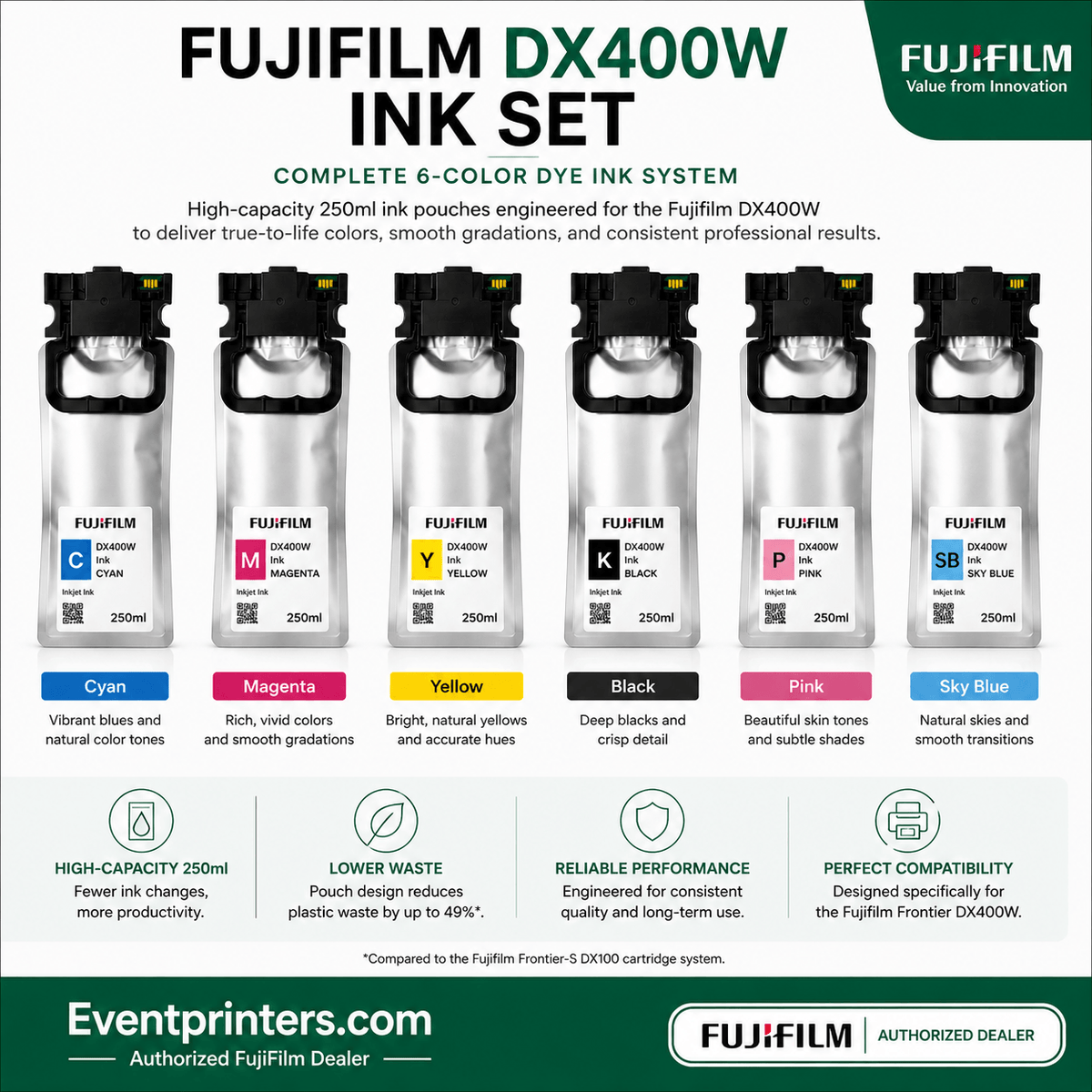
It uses six dye-based ink colors: Cyan, Magenta, Yellow, Black, Pink and Sky Blue. Each DX400W ink supply contains 250 mL.
Manufacturer-listed footprint of only 0.17 m².
Six-color photographic dye-ink system.
Roll output through 210 × 1,000 mm.
USB plus wired LAN connectivity.
What Do You Need to Start Printing with the DX400W?
One of the most important things to understand before purchasing the DX400W is that the printer itself is only one part of the operating system. The six printing inks are not included with the printer and must be purchased separately. You will also need compatible FUJIFILM dry photo paper.
DX400W Printer
The professional printer itself. Check the current product page for pricing, availability and current package contents.
All Six Ink Colors
Black, Cyan, Magenta, Yellow, Pink and Sky Blue — 250 mL per color.
FUJIFILM Photo Paper
Choose the correct roll width and Glossy or Luster finish for the products you intend to sell.
Recommended startup approach: If you are buying a new DX400W, budget for the printer, one complete six-color ink set and at least one compatible paper roll. Professional users should also consider keeping a spare maintenance tank and replacement ink inventory available.
What Makes the DX400W Different?
FUJIFILM states that the redesigned printer can produce up to 400,000 sheets over its product life under specified conditions.
FUJIFILM describes the DX400W as approximately 30% smaller than its predecessor.
250 mL per DX400W supply versus 200 mL per DX100 cartridge.
FUJIFILM reports approximately 49% less ink-package waste compared with the DX100 cartridge system.
The DX400W also adds a built-in operation panel and front-focused maintenance. Ink replacement, paper replacement and scrap-paper handling are designed around easier access during routine commercial operation.
FUJIFILM Frontier DX400W Specifications
| Specification | FUJIFILM Frontier DX400W |
|---|---|
| Printing Technology | Professional inkjet dry-lab photo printing |
| Print Modes | Draft, Standard, High Quality |
| Resolution |
720 × 360 dpi Draft 720 × 720 dpi Standard 1440 × 720 dpi High Quality |
| 4×6 Speed | Approximately 9.4 seconds per sheet in Standard mode |
| Print Size Range | 89 × 50 mm to 210 × 1,000 mm |
| Approximate Imperial Range | 3.5 × 2" through 8.3 × 39.4" |
| Ink System | 6-color dye ink: C, M, Y, K, Pink, Sky Blue |
| Ink Capacity | 250 mL per color |
| Paper Loading | 1 roll |
| Roll Paper Finishes | Glossy / Luster |
| Connectivity | USB + wired LAN |
| Footprint | 0.17 m² |
| Dimensions | 460 × 374 × 340 mm / approx. 18.1 × 14.7 × 13.4" |
| Weight | 17.9 kg / approx. 39.5 lb, excluding paper and ink supplies |
| Power Consumption | 80 W manufacturer specification |
Manufacturer specifications may change. Always verify current requirements before purchasing, especially operating-system compatibility and installation requirements.

Designed for Counters, Studios and Production Areas
The DX400W measures approximately 18.1 inches wide × 14.7 inches deep × 13.4 inches high and weighs approximately 39.5 pounds before paper and ink are installed.
FUJIFILM lists a footprint of 0.17 m², making the printer practical for businesses where counter space or production-room space is limited.
Routine tasks such as replacing roll paper, changing ink and removing paper scraps are concentrated toward the front of the machine.
Why Does the DX400W Use Pink and Sky Blue Ink?
The DX400W uses the familiar Cyan, Magenta, Yellow and Black channels plus Pink and Sky Blue.
FUJIFILM states that its six-color system is intended to improve photographic gradation, color reproduction, skin texture and subtle color changes.
Pink and Sky Blue are separate ink channels — they do not replace Magenta or Cyan. All six colors are required for normal operation.
What Sizes Can the FUJIFILM DX400W Print?
One of the DX400W's strongest advantages is its broad size range. FUJIFILM specifies finished roll-paper output from 89 × 50 mm through 210 × 1,000 mm.
Current FUJIFILM U.S. specifications list roll widths of: 89 mm, 102 mm, 127 mm, 152 mm, 203 mm and 210 mm. Glossy and Luster versions are listed across these widths.
Everyday photo printing, event photography and retail orders.
Portrait packages, weddings, schools and professional keepsakes.
Professional portrait, studio and enlargement workflows.
Panoramic and banner-style photographic output through 1,000 mm long.
FUJIFILM DX400W vs DX100
The discontinued Frontier-S DX100 and the DX400W are both six-color professional inkjet photo printers. The DX400W's biggest improvements are not simply the number of colors — they are capacity, durability, connectivity, compactness and operating design.

| Feature | Frontier-S DX100 | Frontier DX400W | Buyer Impact |
|---|---|---|---|
| Ink Colors | 6 | 6 | Both use CMYK + Pink + Sky Blue. |
| Ink Capacity | 200 mL per color | 250 mL per color | 25% more ink volume per color. |
| Supply Format | Rigid cartridge | Ink supply / pouch system | Reduced packaging waste. |
| 4×6 Standard Speed | Approx. 10 sec | Approx. 9.4 sec | Modestly faster current platform. |
| Connectivity | USB | USB + wired LAN | More flexible commercial installation. |
| Platform Status | Discontinued | Current | Current printer and supply ecosystem. |
Our buying perspective: If your DX100 is still serving your business well, the DX400W is not an automatic upgrade simply because it is newer. The stronger reasons to upgrade are the current platform, 250 mL supplies, wired LAN, redesigned body, improved durability and easier long-term equipment planning.
DX400W vs Epson SureLab D1070 vs DNP Dye-Sub Printers
These printers serve overlapping professional markets, but they are not identical products. The best choice depends on whether you prioritize flexible inkjet output, mobile dye-sublimation simplicity, 8-inch enlargements, networking, or raw event-printing workflow.
| Printer | Technology | Useful Comparison Point | Our View of Best Fit |
|---|---|---|---|
| FUJIFILM DX400W | 6-color inkjet dry lab | 9.4-sec 4×6 Standard; output up to 8.3 × 39.4"; 250 mL inks; USB + wired LAN | Labs, studios, retail, schools, attractions and businesses wanting broad print-size flexibility. |
| Epson SureLab D1070 | 6-color inkjet minilab | Epson states up to 460 4×6 prints/hour, 250 mL ink packs and built-in wireless connectivity. | A direct professional inkjet-minilab alternative worth comparing when wireless workflow and high 4×6 throughput matter. |
| DNP DS620A | Dye-sublimation | Approx. 8.3-sec 4×6; up to 6×8 standard output; compact 6-inch event-printer workflow. | Excellent for mobile photo booths, events and operators focused heavily on 2×6, 4×6 and 6×8. |
| DNP DS820A | Dye-sublimation | 8×10 in approx. 29.3 sec; 8×12 output and panoramic capability. | Strong option for portrait, school, sports and studio businesses wanting dedicated 8-inch dye-sub output. |
Manufacturer speed measurements use different test methods and should not be treated as perfectly equivalent benchmarks. Compare the complete workflow, required print sizes, media system and intended application rather than one speed number alone.
For a typical photo booth: We would usually favor a dedicated dye-sublimation printer such as the DNP DS620A when the workflow is primarily 2×6 strips and 4×6 photos. The DX400W becomes much more compelling when your business wants to sell a broader range of photographic products and sizes from the same machine.
Does the FUJIFILM DX400W Work with Mac and Windows?
As of October 2026, FUJIFILM's U.S. DX400W download page provides Printer Driver / Maintenance Tool downloads for both Windows and Mac OS.
Operating-system support can change as FUJIFILM releases new drivers. Before purchasing, we recommend checking FUJIFILM's current download page against the exact Windows or macOS version you intend to use.
FUJIFILM currently provides a Windows Printer Driver / Maintenance Tool from its official DX400W support page.
FUJIFILM currently also provides a Mac OS Printer Driver / Maintenance Tool from its U.S. DX400W download page.
Does the DX400W Have Wi-Fi?
FUJIFILM's current U.S. documentation specifies USB and wired LAN connectivity. It does not list built-in Wi-Fi as a DX400W connection method.
Wired LAN can be particularly useful in a fixed retail, studio or production environment because printer placement does not have to depend on the location of a directly connected computer.
Network security note: FUJIFILM has published a security notice recommending that DX400W users change the printer's default administrator password when connecting the printer to a network. Follow current FUJIFILM security and firmware guidance.
Who Should Buy the FUJIFILM DX400W?
Flexible commercial output without a traditional chemical minilab.
Multiple photo sizes, enlargements and on-demand client orders.
Broad product selection from a compact professional printer.
Flexible sizes for portrait and package workflows.
Souvenir photography and customer-facing photo products.
Useful where product variety matters more than a single fixed format.
Professional photographic output for departmental use.
FUJIFILM supports multi-unit configurations with additional software and equipment.
Printer, Ink, Paper & Maintenance Supplies
A professional printer is only useful when you can keep it supplied. EventPrinters.com carries the DX400W printer together with genuine FUJIFILM ink, compatible dry photo paper and maintenance supplies.
For individual DX400W ink colors and compatibility guidance, see our FUJIFILM DX100 & DX400W Ink Collection and our DX400W Ink Buying Guide .
Buying a DX400W for Your Business?
Contact EventPrinters.com if you are buying multiple printers, building a new photo-printing operation, or planning recurring ink and paper purchases. We can help confirm the printer, consumables and basic compatibility before you order.
We work with professional photographers, studios, photo labs, event businesses, retailers, schools, attractions, government customers and other commercial users.

Professional Photo Printing Specialists
EventPrinters.com is operated by Southtrend Corp., an Authorized FUJIFILM Dealer serving the professional printing industry since 1996.
Our business focuses on professional photo printers and their genuine OEM consumables. That allows us to help customers evaluate printer type, print size, consumables and workflow requirements before making a professional equipment purchase.
We stock or sell professional systems and supplies from brands including FUJIFILM, DNP, HiTi, Sinfonia and Sawgrass, giving us a broader perspective than a single-product manufacturer page.
FUJIFILM Frontier DX400W FAQ
How fast does the FUJIFILM DX400W print a 4×6 photo?
FUJIFILM specifies approximately 9.4 seconds per 4×6 sheet in Standard mode. Actual production performance can vary with workflow and operating conditions.
How many ink colors does the DX400W use?
Six: Cyan, Magenta, Yellow, Black, Pink and Sky Blue. Each DX400W ink supply contains 250 mL.
Does the DX400W include ink?
No. The six DX400W printing ink supplies are purchased separately. Plan for all six colors when budgeting for a new printer installation.
What paper does the DX400W use?
FUJIFILM lists Quality Dry Photo Paper in Glossy and Luster finishes across multiple roll widths including 89, 102, 127, 152, 203 and 210 mm.
What is the largest print the DX400W can produce?
FUJIFILM specifies roll-paper output through 210 × 1,000 mm, approximately 8.3 × 39.4 inches.
Does the DX400W work with Mac?
As of October 2026, FUJIFILM's U.S. DX400W download page lists a Printer Driver / Maintenance Tool for Mac OS. Because supported OS versions can change, verify your exact macOS version on FUJIFILM's current download page before ordering.
Does the DX400W work with Windows?
Yes. FUJIFILM currently provides a Windows Printer Driver / Maintenance Tool on its official U.S. DX400W download page. Confirm the exact Windows version you intend to use before purchase.
Does the DX400W have Wi-Fi?
FUJIFILM's current U.S. documentation specifies USB and wired LAN connectivity. Built-in Wi-Fi is not listed as a DX400W connectivity method.
Is the DX400W better than the DX100?
It is the newer platform and adds several practical improvements including 250 mL ink supplies, wired LAN, a smaller body and redesigned durability and maintenance features. Both printers use six dye-based ink colors.
Is the DX400W good for photo booths?
It can be a strong choice for a photo booth or event business that wants broader print-size flexibility. If your workflow is almost exclusively fast 2×6 strips and 4×6 prints, a dedicated dye-sublimation printer such as the DNP DS620A may be simpler.
What is the difference between the DX400W and DNP DS620A?
The DX400W is a six-color inkjet dry lab with broader roll-paper size flexibility and wired LAN. The DS620A is a compact dye-sublimation printer optimized for fast event and photo-booth formats such as 2×6, 4×6, 5×7 and 6×8.
What is the difference between the DX400W and Epson SureLab D1070?
Both are professional six-color inkjet photo-production systems using 250 mL supplies. Epson emphasizes very high small-format production speed and includes wireless connectivity, while the FUJIFILM DX400W emphasizes FUJIFILM's Frontier workflow, broad roll-paper output and USB plus wired LAN. Compare software, supported sizes, operating environment and consumables before choosing.
Where can I buy genuine DX400W ink and paper?
EventPrinters.com carries genuine FUJIFILM DX400W inks, complete six-color ink sets, maintenance supplies and compatible FUJIFILM dry photo paper.
Can EventPrinters.com help with a volume DX400W order?
Yes. Contact us at 305-653-0037 for multiple printers, institutional requirements, recurring supplies or help confirming your intended application.
Primary Manufacturer Sources
We use manufacturer documentation as the primary source for technical specifications. Useful current references include:
- FUJIFILM USA — Frontier DX400W Overview
- FUJIFILM USA — Frontier DX400W Specifications
- FUJIFILM USA — Drivers, Firmware, Manuals & Support Downloads
- FUJIFILM USA — Frontier-S DX100 Specifications
- Epson USA — SureLab D1070 Manufacturer Information
- DNP — DS620A Manufacturer Information
- DNP — DS820A Manufacturer Information
Ready to Decide Whether the DX400W Fits Your Business?
Review current printer pricing and availability, build your ink and paper setup, or contact EventPrinters.com if you want help comparing the DX400W with a dye-sublimation or competing professional inkjet system.