
EVENTPRINTERS.COM · AUTHORIZED FUJIFILM DEALER
Fujifilm DX400W Manuals, Drivers & Maintenance Help
Find Fujifilm's official user manual, Windows and Mac software, and illustrated maintenance guides for the Frontier DX400W. Start with the task you need below.
A dealer support resource from Southtrend Corp., serving the professional printing industry since 1996.
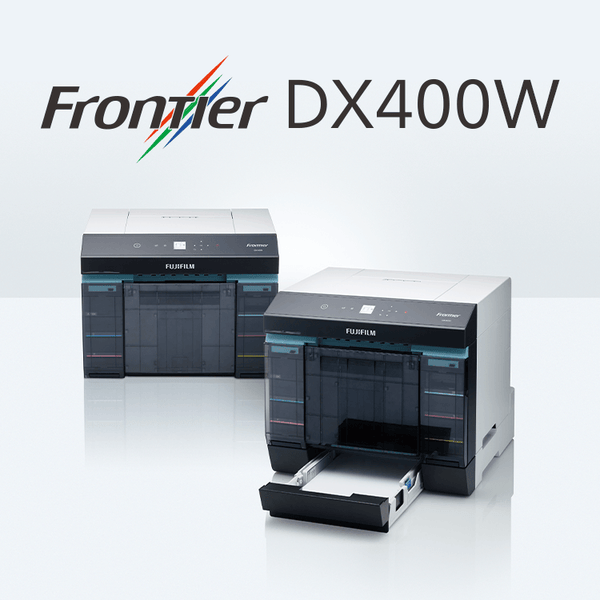
Using this page: Our summaries help you find the right procedure. Follow the complete Fujifilm instructions, illustrations, and handling precautions for your task. External manual and guide links open Fujifilm-hosted resources in a new tab.
Official Fujifilm DX400W Manuals & Downloads
The Frontier DX400 Series manual covers operation, settings, maintenance, and troubleshooting. Use the quick guides for illustrated help with individual tasks.
Complete manual, including the DX400W. Fifth edition.
Roll installation, spindle positioning, and paper guides.
Replacing an ink supply unit using its tray.
Removing and replacing the waste-ink container.
Emptying and reinstalling the paper-trim container.
Fujifilm's overview of the printer and its features.
Paper-jam guides are grouped in the troubleshooting section below. For newly released documents, check Fujifilm's DX400W download page.
DX400W Drivers, Maintenance Tools & Firmware
Fujifilm provides separate Windows and Mac OS software options. Open the official download page, select the appropriate operating system, and follow the user-agreement and installation instructions.
Windows
Select the Windows Printer Driver / Maintenance Tool entry. Check the release information for supported Windows versions before installing.
Mac OS
Select the Mac OS Printer Driver / Maintenance Tool entry. Check compatibility with your exact macOS version before installing.
Firmware: Use the Firmware entry on the same Fujifilm page and follow the instructions supplied with the update.
Open Fujifilm Software & Firmware Downloads ↗Loading Roll Paper: Quick Reference
For loading a replacement roll after removing the old paper, use this overview with Fujifilm's illustrated Load Paper guide.
- Wait for printer operations to finish. Remove and empty the scrap paper box, then pull out the roll paper unit.
- Remove the spindle without lifting it by the knobs. Fit the new roll and secure the media guides with no gaps.
- Reinstall the spindle with its gear on the right. Feed the paper into the slot until the printer beeps, then align the paper guides.
- Return the roll paper unit, reattach the scrap box, and follow the control-panel prompts.
| Roll width | Approximate inches |
|---|---|
| 89 mm | 3.5 inches |
| 102 mm | 4 inches |
| 127 mm | 5 inches |
| 152 mm | 6 inches |
| 203 mm | 8 inches |
| 210 mm | 8.3 inches |
Roll width is one dimension of the finished print. Select compatible paper, the required print length, and the correct settings for your job. Product availability varies by width and finish.
Replacing DX400W Ink: Quick Reference
The DX400W uses six 250ml dye-based ink supplies: Cyan, Magenta, Yellow, Black, Sky Blue, and Pink. Match the replacement color to the control-panel message.
- Wait until operations stop and the power light is steady. Check which color requires replacement.
- Open the appropriate ink supply cover. Push the tray inward to release it, pull it out, and lift the old unit by its handle.
- Fit the replacement supply in the tray. Avoid touching its chip and confirm the color label.
- Return the tray, close the cover, and confirm that the status light is off.
See every step in Fujifilm's illustrated Ink Replacement guide.
Low ink or replace ink? A low-ink notice means prepare the matching replacement. Replace the supply when requested; the message reference below explains the distinction.
Maintenance Box & Scrap Paper Box
Maintenance box: waste ink
This container collects waste ink. When the printer reports that it is nearly full, prepare a replacement and follow the replacement prompt.
For replacement, wait until operations stop, open the right ink supply cover, and remove the box slowly without tilting it. Install the new box and close the cover.
Maintenance Box Replacement PDF ↗Scrap paper box: paper trimmings
This removable box collects paper offcuts. It is separate from the maintenance box.
Wait until operations stop, remove the box, empty the scraps, and reinstall it. Confirm that the status light is off.
Scrap Paper Box PDF ↗Paper Jams & Common Messages
Read the control-panel message and identify the indicated jam location before selecting a guide. If the roll paper unit will not slide out, do not force it; follow the manual's instructions for the affected area.
Illustrated instructions for the roll paper unit.
Follow the illustrated sequence for the paper path shown.
Additional Fujifilm roll-paper jam instructions.
| Code | Meaning | Next step |
|---|---|---|
| I-2201 | Ink is low | Prepare the indicated color. Printing can continue until replacement is requested. |
| W-2202 | Ink replacement required | Replace the ink supply identified on the control panel. |
| I-2401 | Maintenance cartridge nearly full | Prepare a replacement. Follow the printer's replacement prompt. |
| W-1101 | Paper jam | Use the location and illustration on the control panel to choose the appropriate procedure. |
This is a selection of messages, not the complete error list. For another code or a recurring problem, consult the manual's Problem Solver section and collect the details listed under Get help.
DX400W Specifications at a Glance
| Ink system | Six dye-based colors; 250ml per supply |
|---|---|
| Roll-paper finishes | Glossy and Luster |
| Manufacturer-listed print range | 89 × 50 mm to 210 × 1,000 mm |
| DX400W connections | USB 2.0 and wired LAN |
| Dimensions: width × depth × height | 460 × 374 × 340 mm |
Allow the installation and operating clearance specified in the manual. See Fujifilm's full specifications or our DX400W buying guide for more detail.
Find the Correct DX400W Ink & Paper
Use the color and part number to select an individual replacement. Each ink supply below contains 250ml.
| Color / channel | Fujifilm part number |
|---|---|
| Cyan / C | 16821004 — Cyan ink |
| Magenta / M | 16821016 — Magenta ink |
| Yellow / Y | 16821028 — Yellow ink |
| Black / K | 16820995 — Black ink |
| Sky Blue / SB | 16821030 — Sky Blue ink |
| Pink / P | 16821042 — Pink ink |
DX400W Support Questions
Does the Frontier DX400 Series manual cover the DX400W?
Yes. Fujifilm's series manual covers the DX400 and DX400W and identifies their differences. Check the model on the printer's rear rating plate when selecting instructions.
Where can I find a DX400W driver for my Mac?
Fujifilm's U.S. download page includes a Mac OS Printer Driver / Maintenance Tool entry. Check its supported operating systems and installation instructions for your computer.
What is the difference between the DX400 and DX400W?
The manual identifies USB 2.0 on the DX400 and both USB 2.0 and network LAN on the DX400W. Use the documentation for your exact model and connection.
Should I replace ink as soon as a low-ink message appears?
Prepare the matching replacement when ink is low. For the I-2201 notice, Fujifilm says printing can continue until the replacement prompt appears.
How do I check for newer manuals or software?
Visit Fujifilm's official DX400W download page. Review the available documents, software requirements, and firmware instructions before updating.
Get Help with Your DX400W
For a recurring issue, have these details ready when contacting your dealer or Fujifilm support:
- Printer model and serial number.
- Exact error message or code, plus a photo of the display.
- Computer operating system, driver version, and USB or LAN connection.
- Paper width and finish, affected ink color if relevant, and the steps already attempted.
EventPrinters.com · Southtrend Corp.
We are an authorized Fujifilm dealer and have served the professional printing industry since 1996. Contact us for help identifying supplies, order assistance, or guidance on the appropriate support resource.
Call 305-653-0037
Monday–Friday, 9am–5pm Eastern Time
info@eventprinters.com
