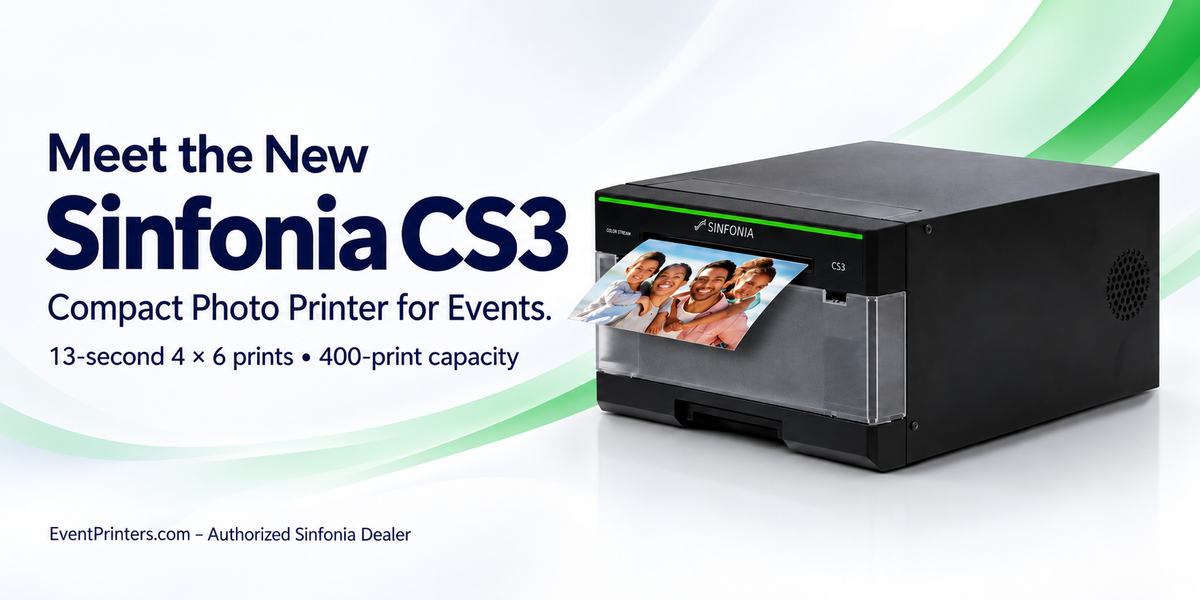
Professional event printing depends on more than a good photograph. Your printer needs to fit your setup, travel between venues, and deliver the keepsakes your customers expect. The new Sinfonia Color Stream CS3 photo printer combines a compact design with increased media capacity and versatile print formats for photo booths and on-site photography.
For photo booth owners, wedding photographers, and event businesses, the CS3 offers a practical combination: 4 × 6-inch prints in approximately 13 seconds, up to 400 4 × 6 prints per media load, and a printer weight of 17.6 pounds or less before supplies and accessories. Optional SwiftCast connectivity adds wireless printing for supported workflows.
The Sinfonia CS3 is a compact professional dye-sublimation photo printer for photo booths, event photography, kiosks, and on-site photo services. It produces formats from 2 × 6-inch photo strips to 6 × 8-inch photographs, with glossy or matte finishes. Its standard connection is USB 2.0.

Compact design for photo booths and mobile events
Space matters when you are building a photo booth, arranging a print station, or loading equipment for the next booking. The CS3 measures approximately 10.7 inches wide, 6.61 inches high, and 13.7 inches deep, making it a practical option for setups where equipment size is a priority.
Its low-profile body is useful for countertop installations and mobile printing stations. When planning an enclosure or case, allow additional room for ventilation, cable connections, print output, and opening the printer for media changes.

Sinfonia CS3 technical specifications
Use the specifications below to match the CS3 to your print formats, available space, and connection requirements.
| Printing and image quality | |
|---|---|
| Printing method | Dye-sublimation thermal transfer |
| Standard resolution | 300 × 300 dpi |
| High-quality resolution | 300 × 600 dpi |
| 4 × 6 print speed | Approximately 13 seconds |
| Print finishes | Glossy and matte |
| Supported print sizes | 2 × 6, 3.5 × 5, 4 × 6, 5 × 7, 6 × 6, and 6 × 8 inches |
| Media and capacity | |
| 4 × 6 capacity | 400 prints per media load |
| 5 × 7 capacity | 200 prints per media load |
| 6 × 8 capacity | 200 prints per media load |
| Printing supplies | Roll paper and YMC dye ribbon with protective overcoat panel |
| Ribbon rewind | Supported |
| Size and weight | |
| Width | 10.7 inches / 272 mm |
| Height | 6.61 inches / 168 mm |
| Depth | 13.7 inches / 348 mm |
| Printer weight | 17.6 lb / 8 kg or less, excluding consumables and accessories |
| Connections and power | |
| Standard interface | USB 2.0 |
| Listed printer driver | Windows 11 |
| Wireless option | Optional SwiftCast wireless printing solution; additional hardware required |
| Power supply | AC 100–240 V, 50/60 Hz |
| Listed power consumption | 150 W |
Print sizes require compatible media and the appropriate software settings. Capacity is per media load, not per retail carton. Dimensions describe the printer body; allow additional operating clearance. Print speed varies with settings and operating conditions.
How fast is the Sinfonia CS3?
The Sinfonia CS3 produces a 4 × 6-inch photo in approximately 13 seconds, making it a practical choice for photo booths, wedding receptions, corporate activations, and other on-site photo services.
For a smooth guest experience, plan the complete printing workflow around your event. Photo selection, image transfer, template processing, and the number of copies requested all contribute to the time between taking a photograph and handing over the finished prints.
More prints between media changes
The CS3 holds enough media for 400 4 × 6-inch prints per load. That is 100 more prints than the CS2’s 300-print capacity, an increase of approximately 33%.
This extra capacity can reduce interruptions during a booking, particularly when several guests request copies of the same photograph. Larger formats also benefit from increased capacity compared with the CS2.
| Print size | CS2 | CS3 | Additional prints |
|---|---|---|---|
| 4 × 6 inches | 300 | 400 | 100 per load |
| 5 × 7 inches | 170 | 200 | 30 per load |
| 6 × 8 inches | 150 | 200 | 50 per load |
What does that mean at an event?
A job requiring 350 individual 4 × 6 prints would exceed
one full CS2 media load but fit within one full CS3 load.
Allow additional supplies for test prints, reprints,
and unexpected demand.
Professional photo quality and versatile finishes
The CS3 combines an optimized thermal printhead with refined color processing for detailed photographic output. ICC profile support helps operators manage color within a compatible printing workflow.
Choose between 300 × 300 dpi standard resolution and 300 × 600 dpi high-quality mode, with glossy or matte finishes to complement your presentation. These options give event businesses flexibility when producing photo strips, branded keepsakes, and larger portraits.
For consistent results, prepare your templates at the correct dimensions and run a test print before the event. Check cropping, logo placement, skin tones, and small lettering using the same software and settings you will use during the booking.
Print sizes for different event packages
The CS3 supports a useful range of formats for photo booth packages and on-site photography. Match the format to the experience you offer:
- 2 × 6-inch photo strips: A familiar choice for wedding booths, parties, and traditional multi-image layouts.
- 4 × 6-inch photos: A versatile format for guest keepsakes, group photographs, and branded event prints.
- 3.5 × 5-inch photos: A smaller print option for packages designed around that format.
- 5 × 7-inch photos: A presentation option for portraits and photographs supplied in matching folders.
- 6 × 6-inch square prints: An alternative layout for square compositions and creative branding.
- 6 × 8-inch photos: The largest supported format, giving portraits and event artwork more room.
Our team can help you identify the media and settings needed for your preferred format before you build your print packages.
Media loading and supply planning
The CS3 uses roll paper and a matching dye-sublimation ribbon. Its ribbon rewind function helps improve ribbon utilization in supported printing configurations.

When estimating supplies, count printed copies rather than guests alone. Group photographs, repeat booth visits, and duplicate-copy requests can change your total consumption considerably.
Before each booking, check the remaining media, pack compatible replacements, and print a sample from your event template. If you are upgrading from a CS2, contact our team to confirm the correct CS3 media before using existing supplies.
Add wireless photo printing with SwiftCast
SwiftCast is an optional wireless printing solution for the Sinfonia CS3. It connects to the printer through USB and creates a local Wi-Fi hotspot, allowing guests to access a browser-based print portal from compatible devices.
The workflow does not require an internet connection or a guest app download. This makes it useful for events where you want a dedicated station for printing photographs from guests’ phones.

How SwiftCast printing works
- Connect to the SwiftCast Wi-Fi hotspot. Guests join the local wireless network from their phone, tablet, or computer.
- Open the print portal. Guests use the local web address or scan the provided QR code.
- Select a photograph and print. Guests preview their image and submit it through the browser interface.
SwiftCast supports browser-based access from iOS, Android, Windows, and macOS devices. Branding and template options let operators customize the guest experience for weddings, corporate events, and promotional activations.
Planning a wireless setup?
The CS3’s standard connection is USB; SwiftCast requires
additional hardware. Tell our team which devices and
photo booth software you use so we can help confirm
the appropriate configuration. Browser-based guest
printing and direct printing from a booth app are
different workflows.
Who should consider the Sinfonia CS3?
The CS3 is a strong candidate for businesses that prioritize portability, compact installation, and versatile event print formats.
- Mobile photo booth operators building a compact setup for weddings, parties, and corporate bookings.
- Event photographers offering printed keepsakes and on-site portrait packages.
- Corporate activation teams producing branded photographs for guests and customers.
- Kiosk and countertop operators working with limited equipment space.
- Existing CS2 owners evaluating a newer printer with increased media capacity.
The best setup depends on your peak print demand, preferred formats, software, and transport requirements. For events where a printing interruption would be especially costly, include backup equipment in your operating plan.
Frequently asked questions about the Sinfonia CS3
How long does the CS3 take to print a 4 × 6 photo?
The Sinfonia CS3 produces a 4 × 6-inch photo in approximately 13 seconds. Total delivery time also includes image transfer, software processing, and any jobs already in the print queue.
How many prints does one CS3 media load produce?
Capacity is 400 prints at 4 × 6 inches, 200 prints at 5 × 7 inches, or 200 prints at 6 × 8 inches, using the appropriate media.
Can the Sinfonia CS3 print photo booth strips?
Yes. The CS3 supports the 2 × 6-inch photo strip format. Use compatible media and the appropriate print layout and cutting settings.
Does the CS3 have built-in Wi-Fi?
The standard CS3 interface is USB 2.0. Wireless printing is available through an optional solution such as SwiftCast. Contact our team for package contents and configuration options.
Can I print from an iPhone, iPad, or Mac?
Optional SwiftCast supports browser-based printing from compatible Apple devices. For a direct computer-to-printer connection or a specific photo booth app, contact us to verify the required software and connection method.
Can I use CS2 media in the CS3?
Contact us with the exact media part number before using supplies purchased for another printer. Matching print dimensions alone do not establish paper-and-ribbon compatibility.
Can the CS3 print 8 × 10-inch photographs?
No. The largest supported CS3 print format is 6 × 8 inches. Our team can help you select another printer if your packages require 8 × 10-inch output.
What should I compare when budgeting for a CS3?
Compare the complete setup: printer, media, transport protection, software, and optional wireless hardware. To estimate media cost per print, divide the kit price by its total stated print yield, then allow for test prints and waste.
Plan your Sinfonia CS3 setup with EventPrinters.com
EventPrinters.com is an authorized Sinfonia dealer operated by Southtrend Corp., serving the printing industry since 1996.
Whether you are building your first photo booth, upgrading an existing printer, or adding wireless guest printing, our team can help you choose the printer, media, and accessories for your workflow.
Ask About the Sinfonia CS3Call 305-653-0037 for current availability, pricing, package contents, and compatibility guidance.
Manufacturer resources
- Sinfonia CS3 U.S. brochure and specifications
- Sinfonia Technology Color Stream CS3 overview
- Sinfonia CS3 product information
- Sinfonia CS2 specifications used for the capacity comparison
- SwiftCast wireless printing features
Specifications reflect the U.S. CS3 information reviewed for this article and may change. Regional configurations and optional accessories may differ. Confirm current package contents, compatibility, and warranty terms with our team before ordering.