How to Choose the Best Photo Booth Printer for Your Business
If you are starting or upgrading a photo booth business, the printer is one of the most important pieces of equipment you will buy. But there is no single best photo booth printer for every operator.
A wedding photo booth producing a few hundred prints in an evening has very different requirements from an eight-hour corporate activation, amusement attraction, retail kiosk, or multi-printer production station.
Some operators should prioritize speed. Others benefit more from high media capacity. A solo operator carrying equipment up stairs may care more about weight than either of those specifications.
That is why we recommend choosing a printer around your actual workflow, event volume, print sizes, transportation requirements, software, and media availability rather than choosing solely by brand or purchase price.
How many prints? Base your estimate on your busiest event, not your average event.
Which print sizes? 2×6 photo strips, 4×6, 5×7, 6×8, specialty prints, or a combination.
How often will you move the printer? Weight and footprint become much more important for mobile operators.
How disruptive is a media reload? At busy events, capacity can matter as much as raw print speed.
Guide by EventPrinters.com — serving professional photographers and photo booth operators since 1996.
Reviewed and updated September 2026.
The Best Photo Booth Printers by Use Case
There is no universal winner. These are the professional printers we would put on a customer's shortlist depending on what the business actually needs.


Popular Photo Booth Printers Compared
This table is useful for narrowing your list. Do not make the entire purchase decision from one specification.
| Printer | 4×6 Speed | 4×6 / Roll | Weight | Best For |
|---|---|---|---|---|
| DNP DS620A | 8.3 sec | 400 | 26.4 lb | Speed + flexibility |
| HiTi P630A | 8.9 sec | 430 | 23 lb | Fast + lightweight |
| Sinfonia CS2 | ≈11 sec | 300 | 22 lb | Compact mobile booths |
| DNP DS-RX1HS | 12.4 sec | 700 | 30 lb | High-volume events |
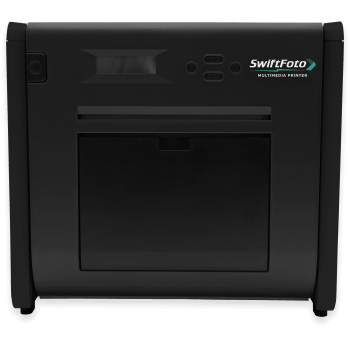
| SwiftFoto KSF-10R | 12.6 sec | 500 | ≈39 lb | Specialty media products |
| HiTi P525L | 12.8 sec | 500 | 39.7 lb | Established event workflow |
| DNP QW410 | 19 sec | 150 | ≈13 lb | Maximum portability |
Approximate manufacturer specifications. Actual throughput depends on driver settings, image processing, print finish, software and workflow.
What Should You Look for in a Photo Booth Printer?
Before comparing model numbers, work through these seven areas. They will eliminate many unsuitable printers quickly.
How Fast Does a Photo Booth Printer Need to Be?
Speed matters most during the twenty minutes when everyone at the event suddenly decides to use the booth.
During a quiet period, the difference between an eight-second printer and a thirteen-second printer may hardly matter. Immediately after dinner at a wedding or during a scheduled corporate-event break, it can become very noticeable.
Remember that the printer is only one part of the workflow. Camera transfer, booth software, template rendering, the number of copies requested, computer performance and network conditions can all affect how long a guest actually waits.
For Busy Events, Capacity Can Matter More Than Speed
This is one of the most frequently underestimated specifications.
A very fast printer still stops when the paper and ribbon run out. Reloading also creates more downtime than the physical media change itself because a guest queue can build while the printer is open.
This is why the DNP DS-RX1HS remains appealing for long events. A 700-print 4×6 roll gives an operator substantially more uninterrupted production than a printer carrying 150, 300 or 400 prints.
Which Print Sizes Will Your Photo Booth Actually Offer?
Do not buy a printer because it supports ten formats if your packages will only offer two. Decide what you intend to sell first.
Do Not Forget That You Have to Carry the Printer
Weight looks like a minor number on a specification sheet until the event ends at midnight and the elevator is unavailable.
A photo booth setup can include the booth enclosure, camera, computer, lighting, backdrop, props, cables, printer, media and transport cases. For a solo operator, shaving ten or twenty pounds from one piece of equipment can make a meaningful difference.
This is where models such as the DNP QW410, Sinfonia CS2 and HiTi P630A deserve serious consideration. If your printer remains permanently installed in a kiosk or studio, weight becomes much less important and capacity may deserve more attention.
Do Not Compare Photo Booth Printers on Purchase Price Alone
You buy the printer once. You keep buying media for as long as you use it.
For a professional operator, media economics can become more important than a small difference in the hardware purchase price. Calculate your cost per print before committing to a printer platform.
Media kit cost ÷ total prints in the kit = media cost per print
Then factor in shipping, labor, transportation, booth software, credit-card fees, equipment replacement and the profit margin your business requires.
Do You Actually Need Wireless Printing?
Many professional photo booths run from a Windows computer connected directly to the printer through USB. In that workflow, built-in Wi-Fi may provide little benefit.
Tablet-based systems, roaming photography, multiple capture devices and customer-facing kiosks can make wireless printing much more valuable.
The DNP WCM Plus can add wireless workflows to compatible professional DNP printers including the DS620A, DS-RX1HS and QW410.
Read our DNP WCM Plus guide →Can You Easily Buy Media Before Your Next Event?
A professional printer is only useful when you can keep it supplied.
Which Photo Booth Printer Should You Choose?
DNP DS620A
Fast output, good portability, strong format support and a mature professional ecosystem make the DS620A a compelling all-around event printer.
DNP DS-RX1HS
Its 700-print 4×6 roll significantly reduces the number of media changes required during high-volume events.
DNP QW410
At approximately 13 pounds, it is extremely attractive for solo operators, small vehicles, compact booths and mobile printing.
HiTi P630A
The P630A combines approximately 8.9-second 4×6 output with a weight of roughly 23 pounds and 430 prints per 4×6 roll.
HiTi P525L
Its front-loading design, 500-print 4×6 roll capacity and established event workflow remain attractive where carrying weight is less important.
Sinfonia CS2
Compact dimensions, approximately 22-pound weight and professional six-inch dye-sublimation output make the CS2 a strong mobile-booth option.
SwiftFoto KSF-10R
Its ability to work with standard, metallic, sticker, translucent and holographic media creates products most conventional photo booths cannot offer.
Do Not Buy the Printer in Isolation
Your booth, camera, computer, lighting, software, printer, media, carrying cases, backdrop and workflow all need to work together. A printer that looks perfect on a specification sheet may be inconvenient once installed inside your actual booth.
Read our complete guide to starting a photo booth business →
Frequently Asked Questions
What is the best printer for a photo booth business?
There is no single best printer for every photo booth business. The DNP DS620A is a strong all-around choice when speed and flexibility matter. The DNP DS-RX1HS is attractive when high media capacity matters more. The QW410 excels at portability, while the HiTi P630A combines fast output with relatively low carrying weight. The Sinfonia CS2 is another compact professional option.
What type of printer do professional photo booths use?
Most professional printing photo booths use dye-sublimation printers. Dye-sub technology produces dry, durable photographs quickly and is well suited to the high-volume, on-site printing requirements of weddings, parties, corporate activations and attractions.
Is DNP or HiTi better for photo booths?
Both manufacturers offer professional printers suitable for photo booths. Compare individual models rather than brands. A DS620A, RX1HS, QW410, P630A and P525L each solve a different set of problems.
How fast should a photo booth printer be?
Many professional six-inch event printers produce a 4×6 photo in roughly 8 to 13 seconds. Ultra-compact models may take longer. Speed matters most during periods when multiple groups use the booth one after another.
Which photo booth printer is the lightest?
Among the printers compared in this guide, the DNP QW410 is the lightest at approximately 13 pounds. That portability comes with lower media capacity and a slower 4×6 print time than some larger printers.
Which photo booth printer has the highest 4×6 media capacity?
Among the printers compared here, the DNP DS-RX1HS has the largest 4×6 loaded-roll capacity at approximately 700 prints per roll, making it attractive for long or high-volume events.
Do I need special paper for 2×6 photo booth strips?
Not always. Many professional printers can cut a 4×6 print into two 2×6 photo booth strips. Perforated media is a separate option when a physical tear-away perforation is specifically required.
How do I calculate photo booth media cost per print?
Divide the current price of the paper-and-ribbon media kit by the total number of prints the kit produces. Because media prices change, calculate this using current pricing rather than relying on an old cost-per-print chart.
Why Buy Your Photo Booth Printer from EventPrinters.com?
EventPrinters.com is operated by Southtrend Corp., a professional photo printing supplier serving the industry since 1996. We supply printers and genuine media to photo booth operators, photographers, studios, retailers, attractions and institutional customers.
Questions about printers, media, compatibility or volume orders? Monday–Friday, 9am–5pm Eastern Time.
Related Photo Booth Printer Guides
Why EventPrinters.com Writes About Photo Booth Printers
EventPrinters.com is operated by Southtrend Corp., a U.S. professional photo printing supplier serving the industry since 1996. Photo booth operators and event photographers represent an important part of our customer base, and the questions discussed in this guide are the same issues customers regularly ask us about when comparing printers.
Because we sell professional printers from multiple manufacturers, we do not believe the same printer should be recommended to every customer. Each model has different strengths in speed, capacity, size, weight, media and workflow.
The best photo booth printer is not necessarily the printer with the most impressive specification. It is the printer that fits your workflow well enough that you can concentrate on your guests rather than your equipment.
Product specifications, media availability, warranty terms, drivers and compatibility may change. Verify critical requirements before purchase. All trademarks belong to their respective owners. Last reviewed September 2026.